LIVE DOCKET
2026-06-25 09:30MOTION HEARINGSMITH v. ACME HOLDINGS 2026-06-1912(b)(6) RESPONSE DUEDOE v. NATIONAL BANK 2026-06-24 10:00MSJ HEARINGCARTER v. WESTRIDGE LLC 2026-06-12SANCTIONS MOTION FILEDREYES v. HORIZON GROUP 2026-06-30DISCOVERY CUTOFFPATEL v. APEX SYSTEMS 2026-07-08 13:00SETTLEMENT CONF.CHEN v. MERIDIAN INC. 2026-06-25 09:30MOTION HEARINGSMITH v. ACME HOLDINGS 2026-06-1912(b)(6) RESPONSE DUEDOE v. NATIONAL BANK 2026-06-24 10:00MSJ HEARINGCARTER v. WESTRIDGE LLC 2026-06-12SANCTIONS MOTION FILEDREYES v. HORIZON GROUP 2026-06-30DISCOVERY CUTOFFPATEL v. APEX SYSTEMS 2026-07-08 13:00SETTLEMENT CONF.CHEN v. MERIDIAN INC.
Filed under : Litigation Infrastructure
Built by : PinkViper Labs
For : Pro se litigants & small firms
Product : Master Command Center
Version : v8.0
License : One-time, lifetime ownership

Your cases.
Your data.
Your war room.

Litigation software for people who file their own motions. Self-hosted. No subscriptions. No one between you and your case files. One-time price. Own it forever.

5+
Active federal & state matters managed daily
30+
Years in data architecture before the courtroom
0
Of your data ever sent to our servers
I.
If you've ever managed a case from a spreadsheet, you know.
Practice management software is built for firms with 50 attorneys, not for the one person fighting a $45 million dispute from a home office with three monitors. Everything else is either a $200-a-month subscription you'll never pay off, or a Word doc that won't tell you a hearing got moved.
PROBLEM 01

You're juggling five cases in your head.

Hearings, deadlines, discovery, settlement positions, witness lists. One missed entry on a calendar and a default judgment shows up in your mail.

PROBLEM 02

Your data sits on someone else's server.

Every SaaS practice tool wants your privileged work product in their cloud. For litigators with sensitive matters, that's not a tradeoff. That's a non-starter.

PROBLEM 03

You're paying $1,200 a year forever.

The subscription model assumes you'll always be litigating. You won't. You just need a tool that does the job, on your machine, that you own.

II.
What's in the box.
Everything you need to run an active litigation portfolio from one screen. No add-ons. No tiers that lock features behind upgrades. Buy it, install it, use all of it.

Your Whole Calendar.

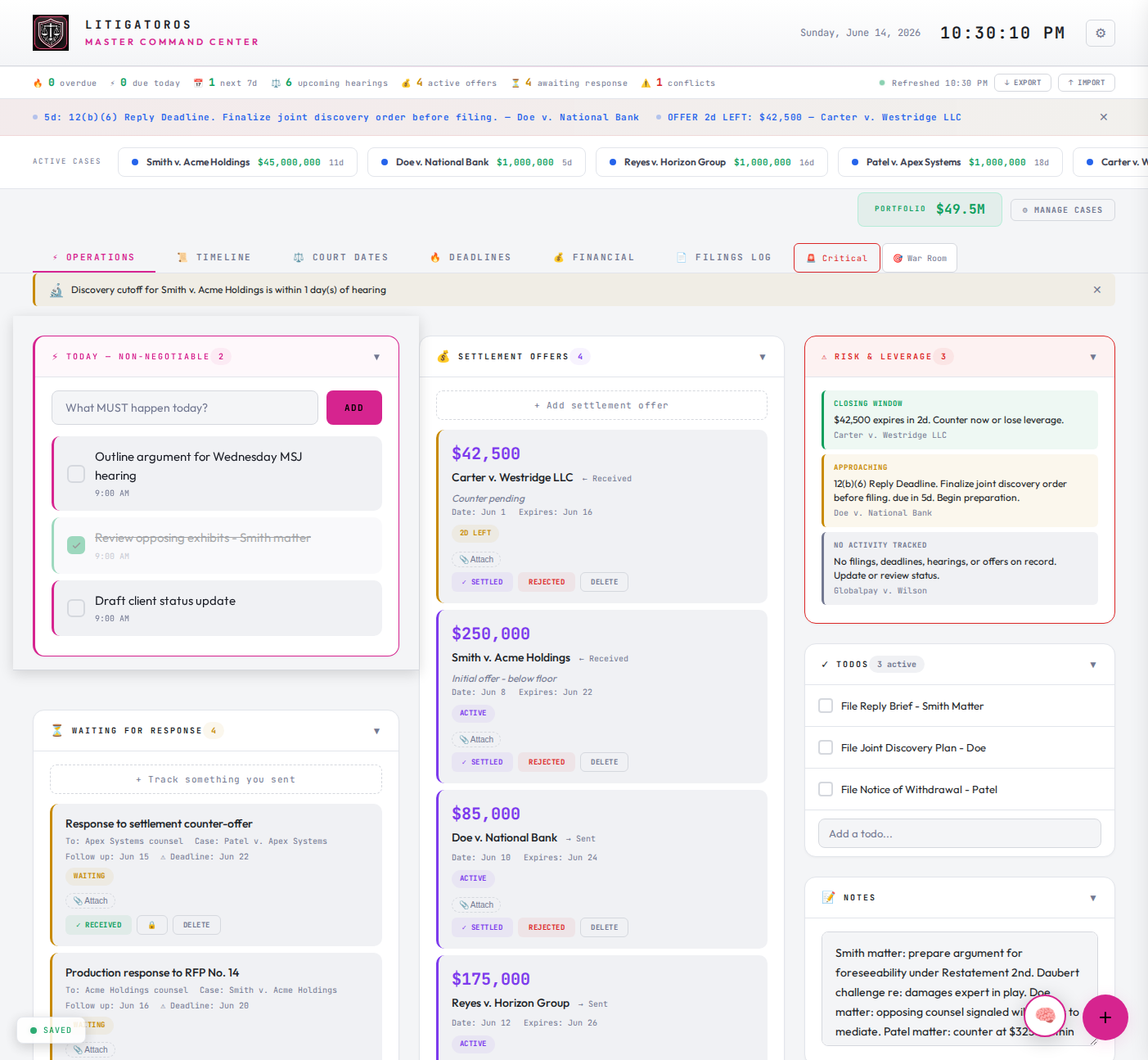
Hearings, deadlines, and depositions next to your kid's game, the school recital, dinner with your partner. Recurring schedules for anything that repeats. Personal life and case calendar in one view. Color-coded by case, jurisdiction, and category.

Cross-Case Views

One screen for every hearing across every matter. Same for discovery, settlement positions, and witness lists. Stop opening five folders.

Settlement Tracker

Log every offer sent and received. Track expiry windows, status, and counter history. See active demands and case-by-case position at a glance.

Risk Radar.

Auto-surfaces what needs attention. Approaching deadlines, stalled offers, overlapping hearings, cases with no recent activity. The dashboard catches what you'd miss between coffee and the next call.

Snapshot History.

Full version control of your case data. Restore from any prior state. Freeze a hearing or offer to lock it; subsequent changes tracked as timestamped amendments. Defensible chain of custody when opposing counsel asks who knew what, when.

Make It Yours.

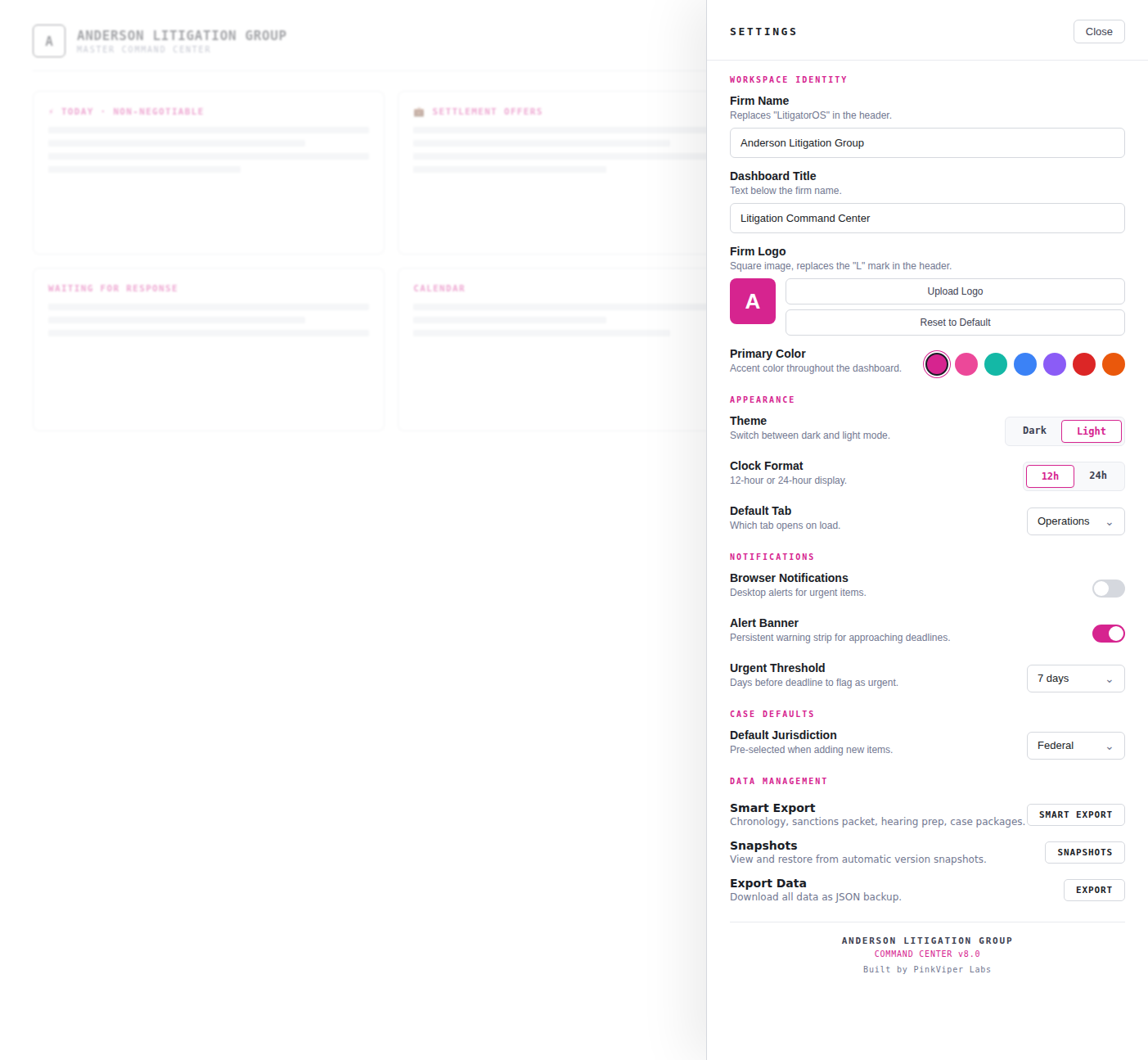
Firm name, logo, primary color, dark or light theme. Tune urgent thresholds, default jurisdiction, which tab opens first. Six color presets or a full picker. Full white-label for internal use, every tier.

Self-Hosted. Yours Alone.

Runs on your DreamHost, your VPS, or your laptop. Your data never touches our servers. Bearer-token auth, per-install credentials, no third-party calls.

Smart Export.

Chronology reports, sanctions packets, hearing prep briefs, full case packages. One click, pre-formatted, ready to file or hand to opposing counsel. The work product the dashboard is built around.

Plus all of this.

Command Palette⌘K

Open it, type, jump to any case, view, or function in two keystrokes.

Frozen Records

Lock a hearing, deadline, or offer. Every later change becomes a timestamped amendment.

Entity Tracking

Catalog opposing counsel, judges, and witnesses with canonical names and aliases. Cross-case.

War Room Mode

Filter the whole dashboard to one case. Trial prep without distractions.

Browser Notifications

Desktop alerts for urgent items. Toggle on or off in settings.

Audit Trail

Every entry, edit, and deletion timestamped and logged. Defensible record of when you knew what.

Quick-Add

Always-visible floating button to add hearings, deadlines, offers, todos, or notes in one tap.

Mobile Touch Gestures

Swipe to act on items. Works on phone and tablet, not just desktop.

Evidence Attachments

Link files and notes to any record. Build the exhibit packet as you go.

Federal & State Aware

Items tag by jurisdiction. Views split federal from state automatically.

Full Backup / Restore

Export your entire portfolio as one file. Import on any install. No vendor lock-in.

Auto-Refresh

Pulls latest state in the background. Open it on two screens, stay in sync.

III.
On the roadmap.
Two years of updates and upgrades come with every license. Here's a glimpse of where we're headed. Tap any feature to be notified when it ships.
Coming

iOS & Android Apps

Pair to your install via QR code. Your data stays on your server; mobile is just another window into the same dashboard.

Get notified →
Coming

PACER Docket Sync

Automatic federal docket pull, no copy-paste. New filings appear in your dashboard within minutes of posting.

Get notified →
Coming

Calendar Sync

Read-only feed of deadlines and hearings to Google Calendar, iCal, or Outlook. Live where you already live.

Get notified →
Coming

Database Adapter

Optional SQLite and MySQL adapters for portfolios that grow large enough to need them. Migrate when you need to, not before.

Get notified →
Coming

Encrypted Backups

Automatic timestamped backups to your own Dropbox, S3, or Google Drive. Your data, redundant, always recoverable.

Get notified →
IV.
One install. Six views.
Same dashboard, six different lenses on your portfolio. Click through, or let it cycle. Every number is one tap away from the underlying record.
litigatoros.app · Master Command Center
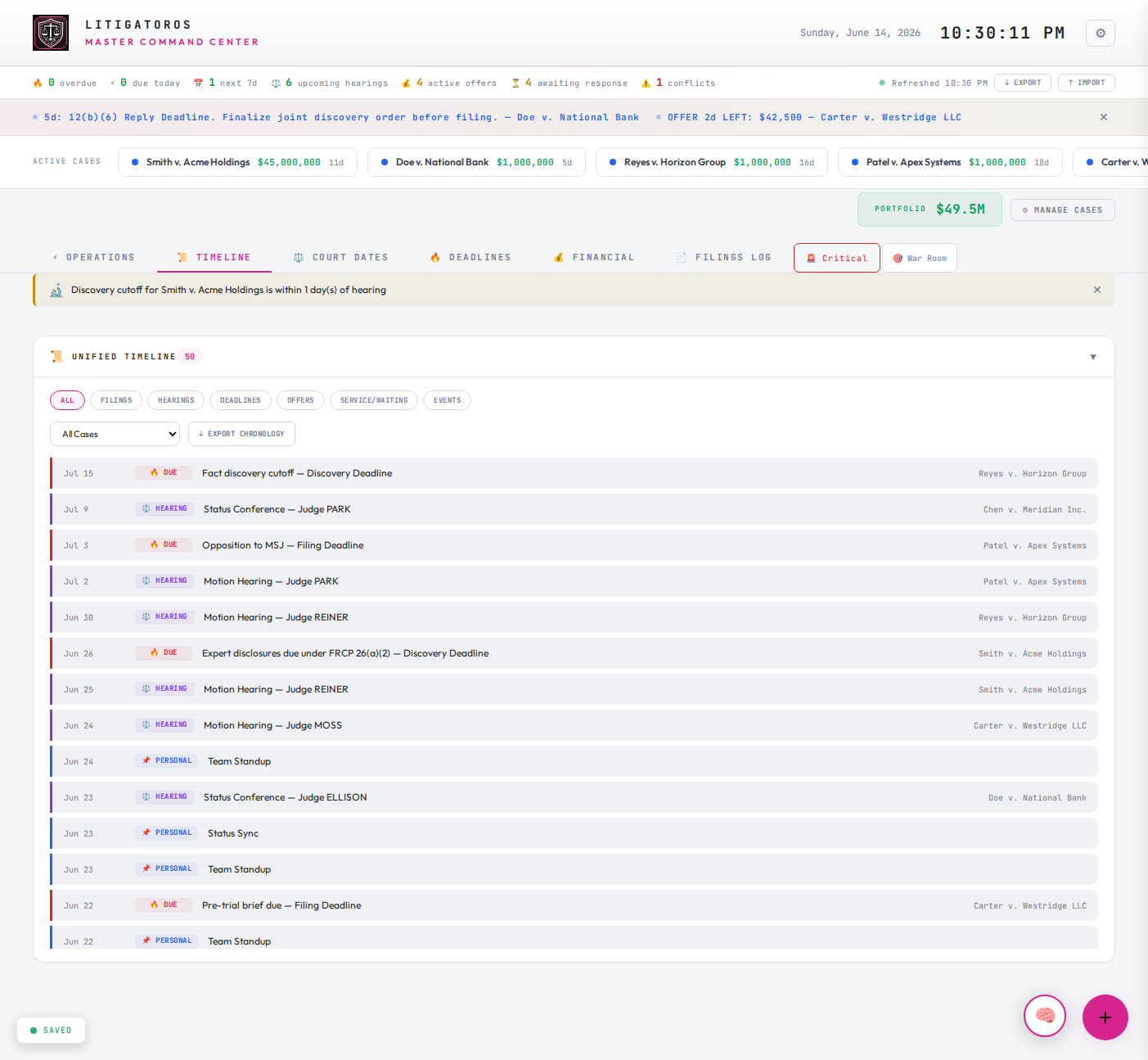
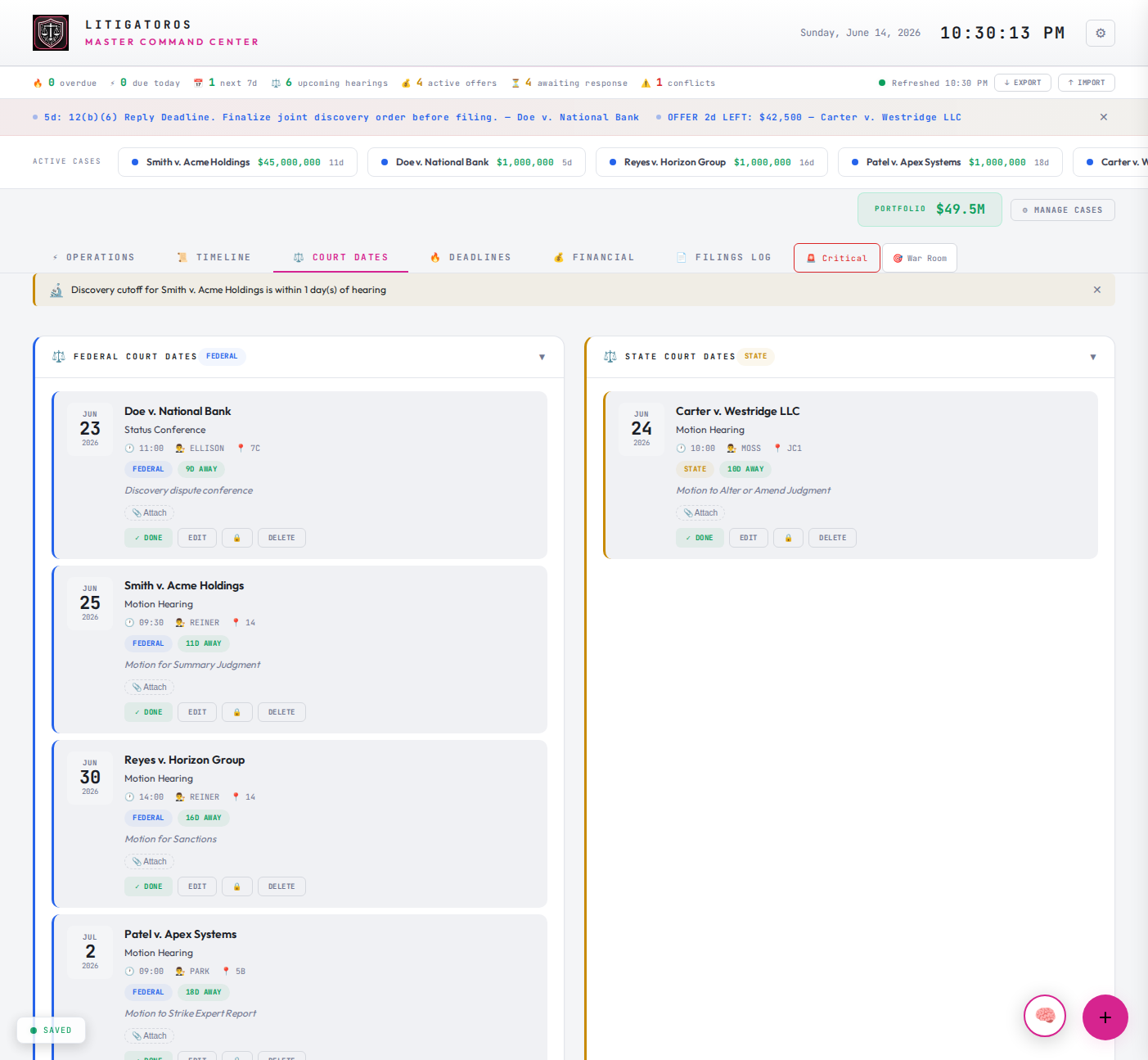
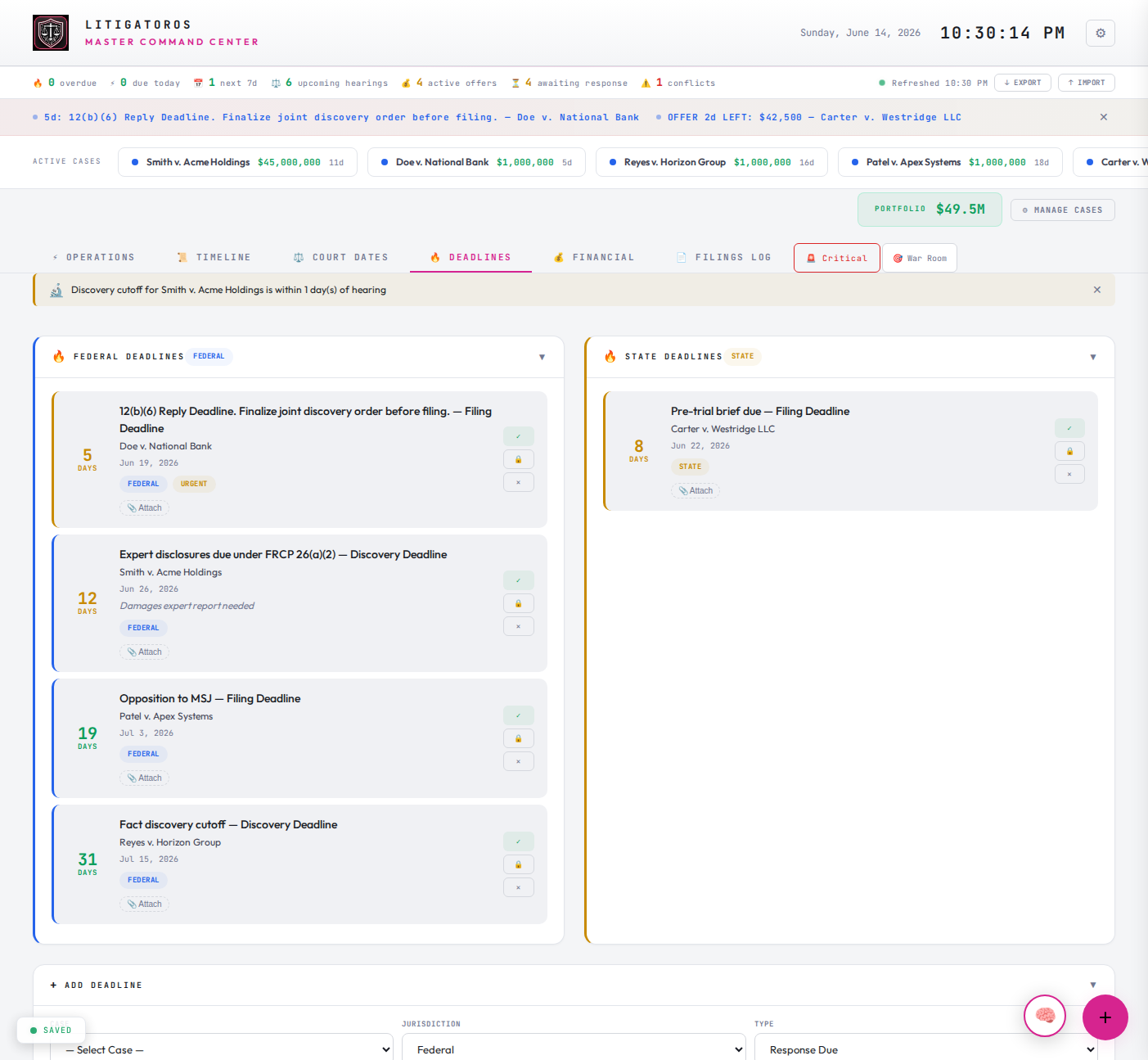
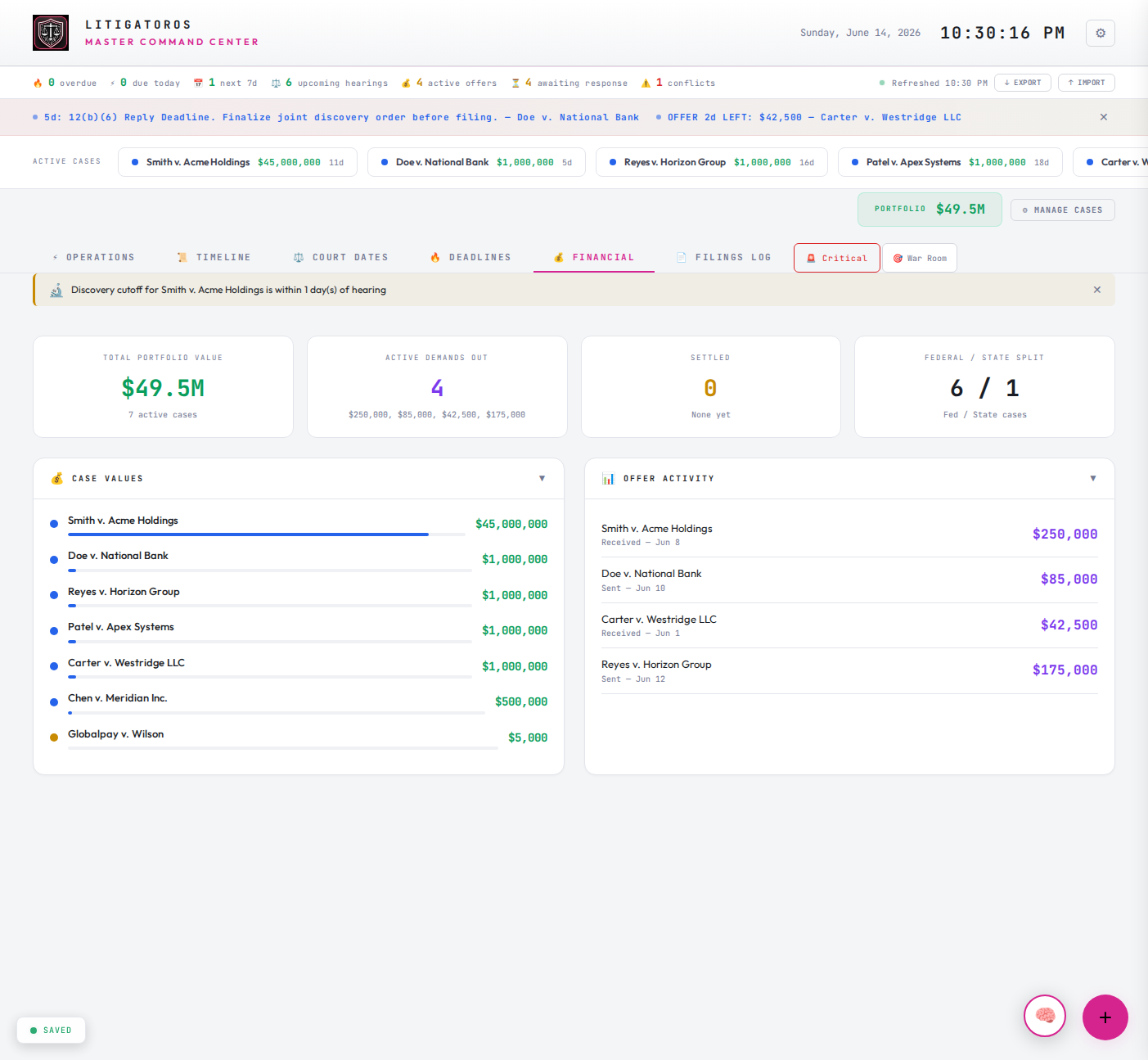
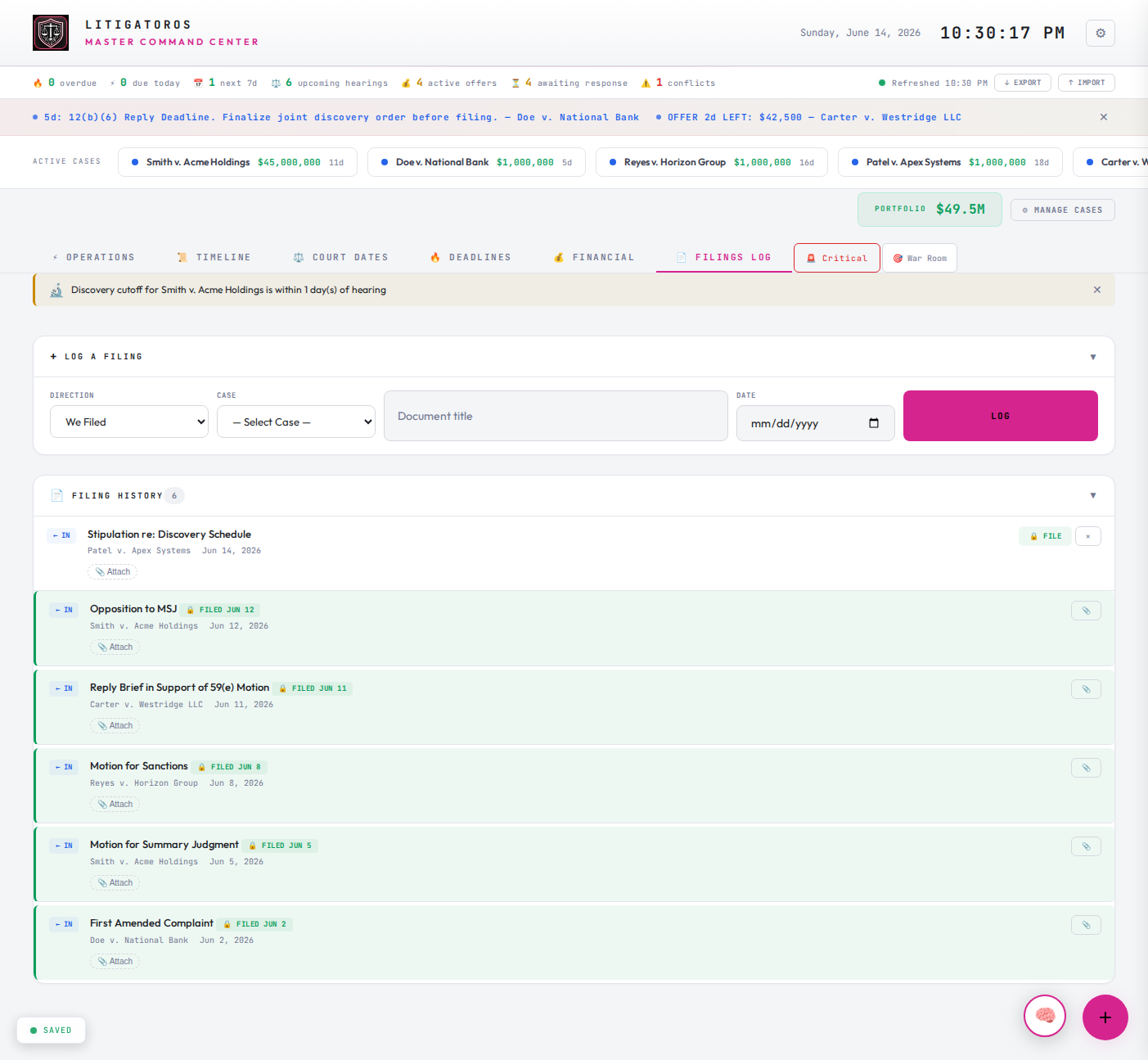
Command Center Operations view showing today's tasks, settlement offers, waiting items, and upcoming events. Command Center Timeline view showing unified chronology of filings, hearings, deadlines, and offers across all cases. Command Center Court Dates view split into federal and state hearings. Command Center Deadlines view showing federal and state filing deadlines with countdown. Command Center Financial view showing portfolio value, active offers, and case value distribution. Command Center Filings Log view showing complete filing history across cases. Command Center Settings panel showing workspace identity, appearance, notifications, case defaults, and data management options. Customize firm name, dashboard title, logo, primary color, theme, clock format, default tab, urgent threshold, and default jurisdiction.
BUILT BY THE LITIGATOR USING IT
Not built for litigators. Built by one.

I'm Jade Burch. Thirty years in data architecture and cybersecurity before this, including federal agency work. None of it prepared me for the moment I realized I'd be litigating my own cases.

Today I'm a pro se litigant in five active federal and state matters. Motions to compel. Oppositions to summary judgment. Sanctions motions. Anti-SLAPP responses. Rule 59(e) reconsiderations. Every kind of filing you can do without a bar number, I've done.

The practice management software built for big firms is not built for someone like me. Or someone like you, if you're reading this and any of it sounds familiar.

LitigatorOS Command Center is what I use every day for my own portfolio. It exists because nothing else fit the actual work of running cases yourself. Every feature, every cross-case view, every export format, came out of a real moment in a real case where the existing tools failed.

You're buying the same dashboard I live in.
Jade Burch
Founder, PinkViper Labs
V.
One price. Own it forever.
Two years of updates and upgrades included. After that, your version keeps working forever. Renew if you want the new builds. No lockouts.
Solo
$499
One-time · Single install
For the independent litigator running their own matters. Everything in one place, on your server.
  • Single user, single install
  • Unlimited cases & matters
  • All cross-case views
  • Self-hosted on your server
  • 2 years of updates & upgrades
  • Email support
Renew at $149/yr for continued updates
Get Solo →
Firm Unlimited
$3,999
One-time · Unlimited users
For larger boutiques and litigation practices. No seat counting, no upgrade walls.
  • Unlimited users, single firm
  • Unlimited cases & matters
  • All cross-case views
  • Self-hosted on your server
  • 2 years of updates & upgrades
  • Priority email + Slack support
Renew at $1,199/yr for continued updates
Get Firm Unlimited →

14-day refund. Email us and we'll refund. Refunds automatically deactivate your license. Fair on both sides.

// ADD-ON · OPTIONAL

Professional Setup

Want us to handle the install? We'll deploy your Command Center to your host, configure your credentials, swap defaults, verify the connection, and walk you through it on a 30-minute call. One business day turnaround.

Install on your host Admin credentials Domain configuration End-to-end verification 30-minute onboarding call
// FIRM UNLIMITED: White-Glove Onboarding available at $1,499 — includes data migration from spreadsheets or existing tools.
$499
One-time · Flat fee
Add Setup →
// 01

Your data, your server.

Runs on shared hosting, a VPS, or your laptop. We never see your files.

// 02

One outbound call. Just the key.

License check at install and every 30 days. Sends your license key, nothing else. No telemetry, no case data, no tracking.

// 03

No vendor lock-in.

Your entire portfolio lives in a localized database on your own server. Back it up, restore it, take it with you. No proprietary lock-in.

VI.
Frequently asked.
The questions we hear before someone buys. If yours isn't here, email hello@litigatoros.com.
Q.01Is this legal advice? +

No. The Command Center is software for organizing your own litigation work. It does not provide legal advice, does not create an attorney-client relationship, and is not a substitute for licensed counsel. You are responsible for every decision you make using it.

Q.02Do I need to be a developer to install it? +

No, but you need basic comfort uploading files to a web host. If you can install WordPress on DreamHost, you can install the Command Center. We provide a step-by-step install guide and a Docker option for technical buyers. Or add Professional Setup at checkout and we'll do it for you.

Q.03What do I need to run it? +

A web host that supports PHP 7.4 or higher. That's it. No external database server to set up, no Node, no build step. Your portfolio lives in a localized database on your own install. Works on DreamHost, Bluehost, SiteGround, Hostinger, or any VPS with PHP installed.

Q.04What happens when my two years of updates end? +

Your installed version keeps working forever. You don't lose access to anything. You just stop getting new builds. Renew when you want updates again. The renewal is paid annually at roughly 30% of the license price, and you can renew anytime, not just at the two-year mark.

Q.05Do you see my data? +

No. The Command Center runs entirely on your server. There is no cloud component for your case data, ever. The software phones home for exactly one thing: a license check at install and roughly every 30 days after. That request sends only your license key. Your cases, hearings, deadlines, notes, filings, and audit log never leave your install.

Q.06What about a mobile app? +

On the roadmap. The mobile app will pair to your existing install via QR code, so your data stays on your server and mobile is just another window into the same dashboard. Included free with any active license when it ships.

Q.07Refund policy? +

14 days, no questions. Email and we'll refund. Refunding automatically revokes your license key. The Command Center re-checks license validity periodically, so within a few days the install will deactivate and stop loading new sessions. By accepting a refund, you agree to stop using the software. Fair on both sides.

Q.08Can I white-label it with my firm's branding? +

Yes, for your own use. Upload your firm's logo, set your firm name in the header, change the display title. The Command Center is yours to brand internally on every tier. What requires a separate commercial agreement is reselling the software, sublicensing it to non-employees, or repackaging it as a different product under your own brand. Use it as your firm's dashboard, not as your firm's product to sell. Reach out if you want to license it for resale.

Q.09Who built this? +

Jade Burch, founder of PinkViper Labs. Thirty-plus years in data architecture and cybersecurity. Currently a pro se litigant in five active federal and state matters, including a $45M case against HCA Healthcare. The Command Center is the dashboard module from her full LitigatorOS platform, packaged as a standalone product you can run on your own server. You're buying the same dashboard she lives in every day.

Stop running cases from a spreadsheet.

One install. One file. Your portfolio, in one place, on your server. Today.

THE LITIGATOROS COMMAND CENTER IS SOFTWARE. IT IS NOT A LAW FIRM, NOT A LAWYER, AND DOES NOT PROVIDE LEGAL ADVICE. NO ATTORNEY-CLIENT RELATIONSHIP IS CREATED BY USING IT.